Saving Pictures In Database#
Picture File Sizes#
Upload sizes are controlled in the php.ini file
PHP allows shortcuts for byte values, including K (kilo), M (mega), and G (giga). PHP will do the conversions automatically if you use any of these. Be careful not to exceed the 32-bit signed integer limit (if you’re using 32-bit versions) as it will cause your script to fail.
NOTE: The php.ini and the my.ini can be accessed through the XAMPP control panel.
Portions of the php.ini file#
; Maximum size of POST data that PHP will accept.
; Its value may be 0 to disable the limit. It is ignored if POST data reading
; is disabled through enable_post_data_reading.
; https://php.net/post-max-size
post_max_size=40M

;;;;;;;;;;;;;;;;
; File Uploads ;
;;;;;;;;;;;;;;;;

; Whether to allow HTTP file uploads.
; https://php.net/file-uploads
file_uploads=On

; Temporary directory for HTTP uploaded files (will use system default if not
; specified).
; https://php.net/upload-tmp-dir
upload_tmp_dir="C:\xampp\tmp"

; Maximum allowed size for uploaded files.
; https://php.net/upload-max-filesize
upload_max_filesize=40M

; Maximum number of files that can be uploaded via a single request
max_file_uploads=20
And/Or
my.ini file for mysql#
The error message “SQLSTATE[HY000]: General error: 2006 MySQL server has gone away” usually occurs when the MySQL server is not responding to the client’s requests. This error can be caused by a variety of reasons, such as a low value of the max_allowed_packet variable, a low value of the wait_timeout variable, or insufficient memory on the server 12345.
To fix this error, you can try the following steps:
Increase the value of the max_allowed_packet variable in the my.cnf configuration file. You can set it to 16M or higher 1.
Increase the value of the wait_timeout variable in the my.cnf configuration file. You can set it to 28800 or higher 3.
Check the memory usage of the server. If the server is running out of memory, you can add a swap file to increase the available memory 1.
If none of these steps work, you can try to reconnect to the MySQL server and execute the query again 1. If the problem persists, you may need to contact your system administrator or MySQL support for further assistance.
# The MySQL server
default-character-set=utf8mb4
[mysqld]
port=3306
socket="C:/xampp/mysql/mysql.sock"
basedir="C:/xampp/mysql"
tmpdir="C:/xampp/tmp"
datadir="C:/xampp/mysql/data"
pid_file="mysql.pid"
# enable-named-pipe
key_buffer=16M
# **********Change to 16 or Greater ****************
max_allowed_packet=16M
# **************************************************
sort_buffer_size=512K
net_buffer_length=8K
read_buffer_size=256K
read_rnd_buffer_size=512K
myisam_sort_buffer_size=8M
log_error="mysql_error.log"
SQL Doggy Database#
-- phpMyAdmin SQL Dump
-- version 5.2.1
-- https://www.phpmyadmin.net/
--
-- Host: 127.0.0.1
-- Generation Time: Nov 09, 2023 at 03:39 AM
-- Server version: 10.4.28-MariaDB
-- PHP Version: 8.2.4

SET SQL_MODE = "NO_AUTO_VALUE_ON_ZERO";
START TRANSACTION;


/*!40101 SET @OLD_CHARACTER_SET_CLIENT=@@CHARACTER_SET_CLIENT */;
/*!40101 SET @OLD_CHARACTER_SET_RESULTS=@@CHARACTER_SET_RESULTS */;
/*!40101 SET @OLD_COLLATION_CONNECTION=@@COLLATION_CONNECTION */;
/*!40101 SET NAMES utf8mb4 */;

--
-- Database: `wp_doggyembed`
--
DROP DATABASE IF EXISTS `wp_doggyembed`;
CREATE DATABASE IF NOT EXISTS `wp_doggyembed` DEFAULT CHARACTER SET utf8mb4 COLLATE utf8mb4_general_ci;
USE `wp_doggyembed`;

-- --------------------------------------------------------

--
-- Table structure for table `table1`
--

CREATE TABLE IF NOT EXISTS `table1` (
  `dogname` varchar(255) NOT NULL,
  `dogbreed` varchar(255) NOT NULL,
  `dogimage` longblob NOT NULL,
  `imagetype` varchar(255) NOT NULL,
  `imagesize` int(45) NOT NULL,
  `table1_pk` int(9) NOT NULL AUTO_INCREMENT,
  PRIMARY KEY (`table1_pk`)
) ENGINE=InnoDB DEFAULT CHARSET=utf8mb4 COLLATE=utf8mb4_general_ci;

--
-- Truncate table before insert `table1`
--

TRUNCATE TABLE `table1`;COMMIT;

/*!40101 SET CHARACTER_SET_CLIENT=@OLD_CHARACTER_SET_CLIENT */;
/*!40101 SET CHARACTER_SET_RESULTS=@OLD_CHARACTER_SET_RESULTS */;
/*!40101 SET COLLATION_CONNECTION=@OLD_COLLATION_CONNECTION */;
dbconnect.php#
<?php

try{

    //table1

    $host = "127.0.0.1:3308";
    $user = "root";
    $pw = "";

    // created a pdo object
    // in production change the user with appropriate privs
    $pdo = new PDO('mysql:host=127.0.0.1:3308;dbname=wp_doggyembed',$user,$pw);

    // lets setup some attributes for the object
    $pdo->setAttribute(PDO::ATTR_ERRMODE,PDO::ERRMODE_EXCEPTION);

    // only for educational purposes
    $dbstatus = "Good database connection";

    echo($dbstatus.'<br><hr><br>');

}
catch(PDOException $ep)
{
    $dbstatus = "Database connection failed<br>".
                    $ep->getMessage();

    // for development purposes
    echo($dbstatus.'<br><hr><br>');

    die();
    // can also use exit
    // we don't page to load any further\
}
catch(Exception $e)
{
    $dbstatus = "Database connection failed<br>".
                    $e->getMessage();

    echo($dbstatus.'<br><hr><br>');

    die();
}

session_start();

?>
index.php#
<!DOCTYPE html>
<html lang="en">
<head>
<meta charset="UTF-8">
<meta name="viewport" content="width=device-width, initial-scale=1.0">
<title>Home</title>
<link rel="stylesheet" href="style.css">
</head>
<body>
<div class = "content">
<h1>Picture Embedding</h1>
<p> <a href="doggyinput.php">Dog Picture Input</a>
<a href="getpix.php">Display Doggy Pictgures</a>
<a href="default.php">home</a>
</p>
</div>
</body>
</html>
doggyinput.php#
The enctype="multipart/form-data" attribute in an HTML <form> specifies how form data should be encoded when it’s submitted to the server. Here’s a breakdown:
Context#
Used in:
<form>elementPurpose: Defines how form data is sent to the server.
Why use multipart/form-data?#
It is necessary when a form includes file uploads, like images, documents, etc. It allows the form to send data in a way that supports sending both text and binary data.
How it works#
When enctype="multipart/form-data" is set:
Each form field’s data is sent as a separate part of the request body.
File data is encoded in binary, while other fields (e.g., text inputs) are encoded as plain text.
Each part is separated by a boundary string that the browser generates, making it easy for the server to parse the data correctly.
<!DOCTYPE html>
<html>
<head>
<meta charset="UTF-8">
<meta name="viewport" content="width=device-width, initial-scale=1.0">
<title>Input</title>
<link rel="stylesheet" href="style.css">
</head>
<body>
<header>
<h1>Doggy Picture Upload</h1>
</header>
<main>
<?php
require('dbconnect.php');
// for testing and demonstonly
// print_r($_POST);
// echo('<br>');
// print_r($_FILES);
// echo('<br><hr><br>');
if(isset($_POST['dogname']) && !empty($_POST['dogname']))
{
// get file specifications
$thedogfile = $_FILES['dogimage']['tmp_name'];
$imagetype = mime_content_type($thedogfile);
$imagesize = filesize($thedogfile);
// Retrieve the file and encode it as base64
// Base64 is a common form of handling data and it is used to ensure
// that the handling of bits accros the network are correct.
$dogimage = base64_encode(file_get_contents($_FILES['dogimage']['tmp_name']));
// sql statement
$sql = "INSERT INTO table1(dogname,dogbreed,dogimage,imagetype,imagesize) ".
"VALUES(:dogname,:dogbreed,:dogimage,:imagetype,:imagesize)";
// prepare sql statement
$sqlobj = $pdo->prepare($sql);
// sanitize input
$dogname = filter_var($_POST['dogname'],FILTER_SANITIZE_STRING);
$dogbreed = filter_var($_POST['dogbreed'],FILTER_SANITIZE_STRING);
// bind
$sqlobj->bindparam(':dogname',$dogname);
$sqlobj->bindparam(':dogbreed',$dogbreed);
$sqlobj->bindparam(':dogimage',$dogimage,PDO::PARAM_LOB);
$sqlobj->bindparam(':imagetype',$imagetype);
$sqlobj->bindparam(':imagesize',$imagesize);
try{
// execute the upload
$uploadcheck = $sqlobj->execute();
}
catch(PDOException $e)
{
$uploadcheck = false;
echo("<br>Upload Failed: ".$e->getMessage());
}
if($uploadcheck)
{
echo('
<br><br>File Uploaded Successfully<br><br>
');
}
}
else
{
// *** NOTE enctype="multipart/form-data" ***
// The enctype="multipart/form-data" attribute in an HTML <form>
// is used when submitting forms that include file uploads.
// It ensures that the form data is sent in separate parts,
// allowing both text and binary data (like files) to be transmitted.
// This encoding is necessary for handling file uploads,
// as it allows the server to process each part correctly,
// separating text fields from file data.
// *******************************************************************
echo('
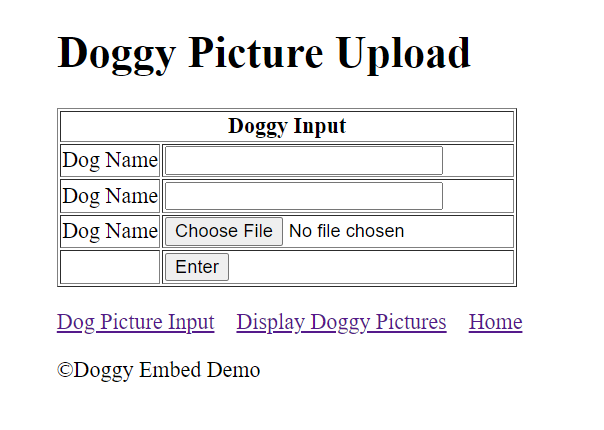
<form action="doggyinput.php" method="POST" enctype="multipart/form-data">
<table border="1">
<tr>
<th colspan=2>Doggy Input</th>
</tr>
<tr>
<td>Dog Name</td>
<td><input type="text" size="25" name="dogname"
value="barky" required> </td>
</tr>
<tr>
<td>Dog Name</td>
<td><input type="text" size="25" name="dogbreed"
value="mutt"> </td>
</tr>
<tr>
<td>Dog Name</td>
<td><input type="file"
name="dogimage"
accept=".jpg,.jpeg,.png"
required> </td>
</tr>
<tr>
<td></td>
<td><input type="submit" value="Enter"></td>
</tr>
</table>
</form>
');
} //end of else
?>
<p><a href="doggyinput.php">Dog Picture Input</a>
<a href="getpix.php">Display Doggy Pictures</a>
<a href="index.php">Home</a>
</p></main>
<footer>©Doggy Embed Demo</footer>
</body>
</html>');
<?php
/*
Upload sizes are controlled in the php.ini file
Items to check
; Maximum size of POST data that PHP will accept.
; Its value may be 0 to disable the limit. It is ignored if POST data reading
; is disabled through enable_post_data_reading.
; https://php.net/post-max-size
post_max_size=40M
Note:
PHP allows shortcuts for byte values, including K (kilo), M (mega) and G (giga).
PHP will do the conversions automatically if you use any of these. Be careful
not to exceed the 32 bit signed integer limit (if you're using 32bit versions)
as it will cause your script to fail.
;;;;;;;;;;;;;;;;
; File Uploads ;
;;;;;;;;;;;;;;;;
; Whether to allow HTTP file uploads.
; https://php.net/file-uploads
file_uploads=On
; Temporary directory for HTTP uploaded files (will use system default if not
; specified).
; https://php.net/upload-tmp-dir
upload_tmp_dir="C:\xampp\tmp"
; Maximum allowed size for uploaded files.
; https://php.net/upload-max-filesize
upload_max_filesize=40M
; Maximum number of files that can be uploaded via a single request
max_file_uploads=20
my.ini file
# The MySQL server
default-character-set=utf8mb4
[mysqld]
port=3306
socket="C:/xampp/mysql/mysql.sock"
basedir="C:/xampp/mysql"
tmpdir="C:/xampp/tmp"
datadir="C:/xampp/mysql/data"
pid_file="mysql.pid"
# enable-named-pipe
key_buffer=16M
# **********Change to 16 or Greater ****************
max_allowed_packet=16M
# **************************************************
sort_buffer_size=512K
net_buffer_length=8K
read_buffer_size=256K
read_rnd_buffer_size=512K
myisam_sort_buffer_size=8M
log_error="mysql_error.log"
*/
?>
getpix.php#
<?php
// database connection
require('dbconnect.php');
// SQL statement
$sql = "SELECT * FROM table1";
// Excecute query and store recordset
$rs = $pdo->query($sql);
?>
<!DOCTYPE html>
<html>
<head>
<meta charset="UTF-8">
<meta name="viewport" content="width=device-width, initial-scale=1.0">
<title>GetPix</title>
<link rel="stylesheet" href="style.css">
</head>
<body>
<header>
<h1>Doggy Pictures</h1>
<p><a href="doggyinput.php">Dog Picture Input</a>
<a href="getpix.php">Display Doggy Pictures</a>
<a href="index.php">Home</a></p>
</header>
<main>
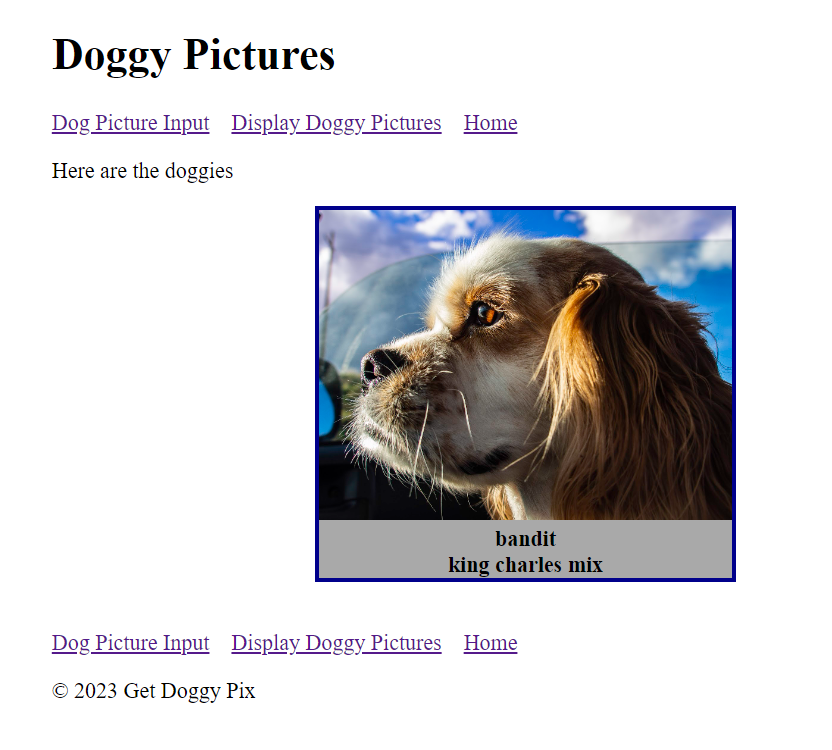
<p>Here are the doggies</p>
<?php
while($row=$rs->fetch())
{
echo('<div class="dogpix">');
// retreive the image
// build data url - example 'data:image/jeg;base64,mypix.jpg'
echo('<img src="data:'.$row['imagetype'].
';base64,'.$row['dogimage'].'" width="300"><br>');
echo($row['dogname'].'<br>'.$row['dogbreed']);
echo('</div><br>');
}
?>
<p><a href="doggyinput.php">Dog Picture Input</a>
<a href="getpix.php">Display Doggy Pictures</a>
<a href="index.php">Home</a></p>
</main>
<footer>
<p>© 2023 Get Doggy Pix </p>
</footer>
</body>
</html>
style.css#
header, main, footer {
    width: 60%;
    margin-left: auto;
    margin-right:auto;
}

.dogpix {
    width: 300px;
    border: 3px solid darkblue;
    background-color: darkgrey;
    margin-left: auto;
    margin-right:auto;
    text-align: center;
    font-weight: bold;
}