<!DOCTYPE html>
<html>
    <head>
        <title>Input Review</title>
        <style>
            .center {
                    margin: auto;
                    width: 50%;
                    }
        </style>
    </head>
    <body>
        <div id="div1" class="center">
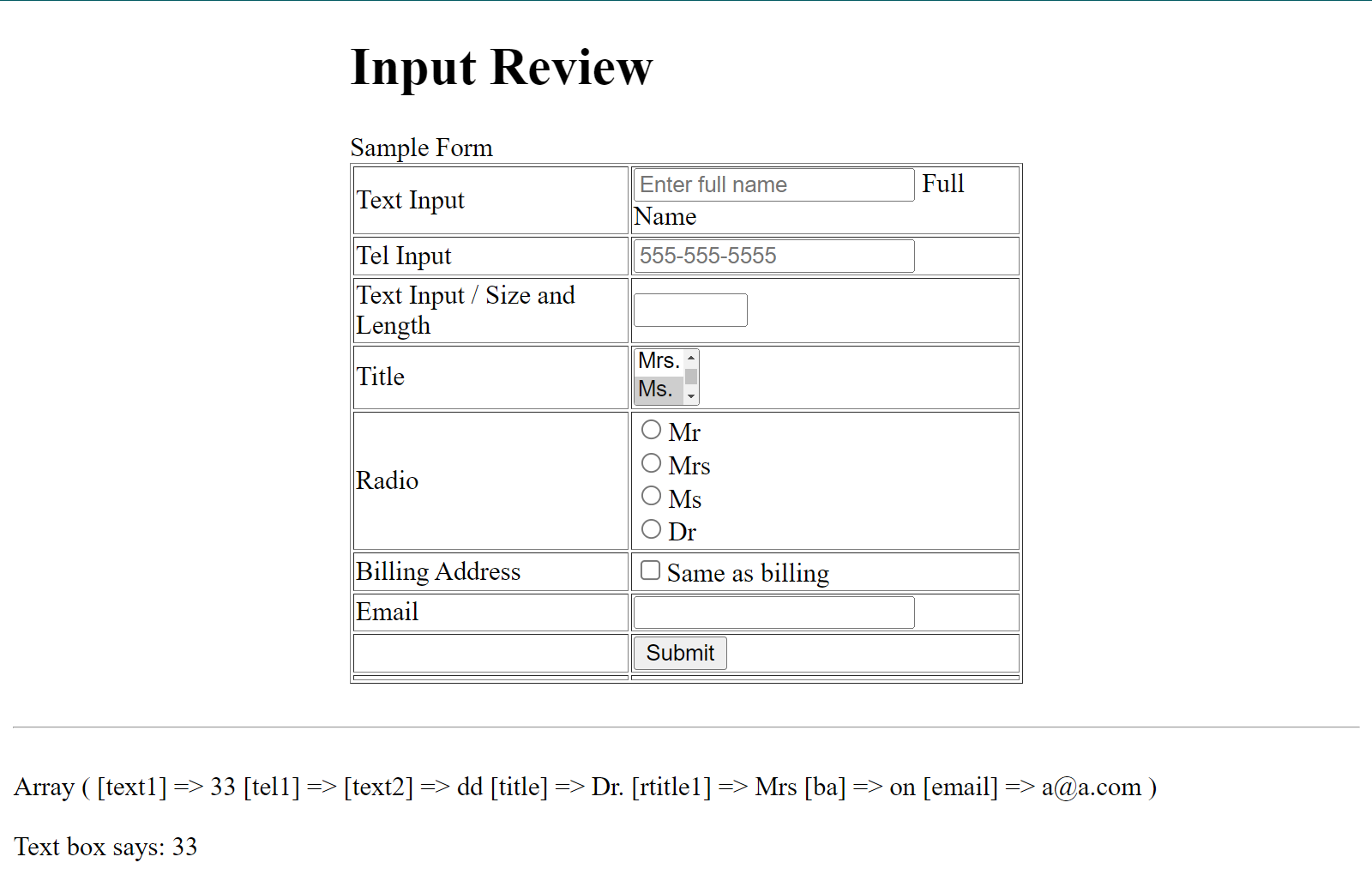
        <h1>Input Review</h1>
        Sample Form
        <form action="inputreview.php" method="POST">
            <table border="1">
                    <!--
                    Text input box allows a user to enter text.
                    type="text"
                    placeholder - this show "sample" text
                    name - used to submit a form element to the server
                    id - used to uniquely identify any element in the html page.
                        The id attribute is used with JavaScript and CSS.
                    required - used to check if a field is "blank"
                    pattern - checks to see if data fits a regex pattern
                    title - is the help text for when a pattern fails
                    maxlength - this is the total length the value is
                                allow to have. A length of 2 only allows
                                the value to be 2 characters long
                    size - this is the display size of the input field
                    -->
                <tr>
                    <td>Text Input</td>
                    <td><input type="text"
                        name="text1" id="text1"
                        placeholder="Enter full name"
                        >
                        <label for="text1">Full Name</label
                        </td>
                </tr>

                    <!--
                    Tel input box allows a user to enter phone number.
                    type="tel"
                    placeholder - this show "sample" text
                    name - used to submit a form element to the server
                    id - used to uniquely identify any element in the html page.
                         The id attribute is used with JavaScript and CSS.
                    required - used to check if a field is "blank"
                    pattern - checks to see if data fits a regex pattern for a phone number
                    title - is the help text for when a pattern fails
                    -->
                <tr>
                <td>Tel Input</td>
                    <td><input type="tel"
                        name="tel1" id="tel1"
                        placeholder="555-555-5555"
                        pattern="[0-9]{3}-[0-9]{3}-[0-9]{4}"
                        title= "Please enter a phone number as shown by the demo"
                        >
                    </td>
                </tr>

                    <!--
                    Text input box allows a user to enter text.
                    type="text"
                    placeholder - this show "sample" text
                    name - used to submit a form element to the server
                    id - used to uniquely identify any element in the html page.
                        The id attribute is used with JavaScript and CSS.
                    required - used to check if a field is "blank"
                    pattern - checks to see if data fits a regex pattern
                    title - is the help text for when a pattern fails
                    maxlength - this is the total length the value is
                                allow to have. A length of 2 only allows
                                the value to be 2 characters long
                    size - this is the display size of the input field
                    -->

                <tr>
                    <td>Text Input / Size and Length</td>
                    <td><input type="text"
                        name="text2" id="text2"
                        maxlength="2"
                        size= "5"
                        value=""
                        required></td>
                </tr>

                <!--
                Drop Down Fields
                name - used to submit a form element to the server
                id - used to uniquely identify any element in the html page.
                    The id attribute is used with JavaScript and CSS.
                size - is the number of rows to on the dropdown form
                the <option value> tag is used to set the drop down values
                -->
                <tr>
                    <td>Title</td>
                    <td>
                        <select name="title" id="title" size="2" >
                            <option value="Mr." >Mr.</option>
                            <option value="Mrs.">Mrs.</option>
                            <option value="Ms." selected>Ms.</option>
                            <option value="Dr.">Dr.</option>
                        </select>
                    </td>
                </tr>

                <!--
                Radio Buttons
                Radio buttons can have unique id's.  However, in order to group the buttons
                so only one button is selected per group, the same group name is used
                in the "name" attribute.  Below is an example of two groups - rtitle1 and
                rtitle2
                -->
                <tr>
                    <td>Radio</td>
                    <td>
                        <input type="radio" value="Mr" id="rd1" name="rtitle1">
                        <label for="rd1">Mr</label><br>

                        <input type="radio" value="Mrs" id="rd2" name="rtitle1">
                        <label for="rd2">Mrs</label><br>

                        <input type="radio" value="Ms" id="rd3" name="rtitle2">
                        <label for="rd3">Ms</label><br>

                        <input type="radio" value="Dr" id="rd4" name="rtitle2">
                        <label for="rd4">Dr</label><br>

                        </td>
                </tr>

                <!--
                Checkbox will evaluate to the value of "on" when checked.
                -->
                <tr>
                    <td>Billing Address</td>
                    <td><input type="checkbox" id="ba" name="ba"><label for="ba">Same as billing</label></td>
                </tr>

                <!--
                Email will check to see if there is an @ sign in the text
                -->
                <tr>
                    <td>Email</td>
                    <td><input type="email" name="email" id="email"></td>
                <tr>
                    <td></td>
                    <td><input type="submit"</td>
                </tr>

                <tr>
                    <td></td>
                    <td></td>
                </tr>
            </table>
        </form>
</div>

        <br><hr><br>

        <?php
            if(!empty($_POST['text1']))
            {
                print_r($_POST);

                echo("<br><br>Text  box says: " . $_POST['text1']);

            }

        ?>
    </body>
</html>